


There is a thing nobody tells you when you start using AI, and it cost me a few weeks to figure out on my own.
“Claude” is not one thing. It is a few different things wearing the same name. There is the chat window you type into. There is a version that lives in your code. There is one that does work alongside you like a coworker. There is one that drives your web browser. They look related because they share a name, and they are, but they are not the same tool, and you do not use them for the same jobs.
I spent real hours stumbling between them, opening the wrong one for the wrong task, getting frustrated, assuming I was doing it wrong. I was not doing it wrong. I just did not have the map. So here is the map.
The short version: you start in one place, and you stay there a long time. Everything else is something you graduate to when you have a reason. If you read nothing past this paragraph, read this. Start with Claude.ai. Live there. The rest can wait until you actually need it.
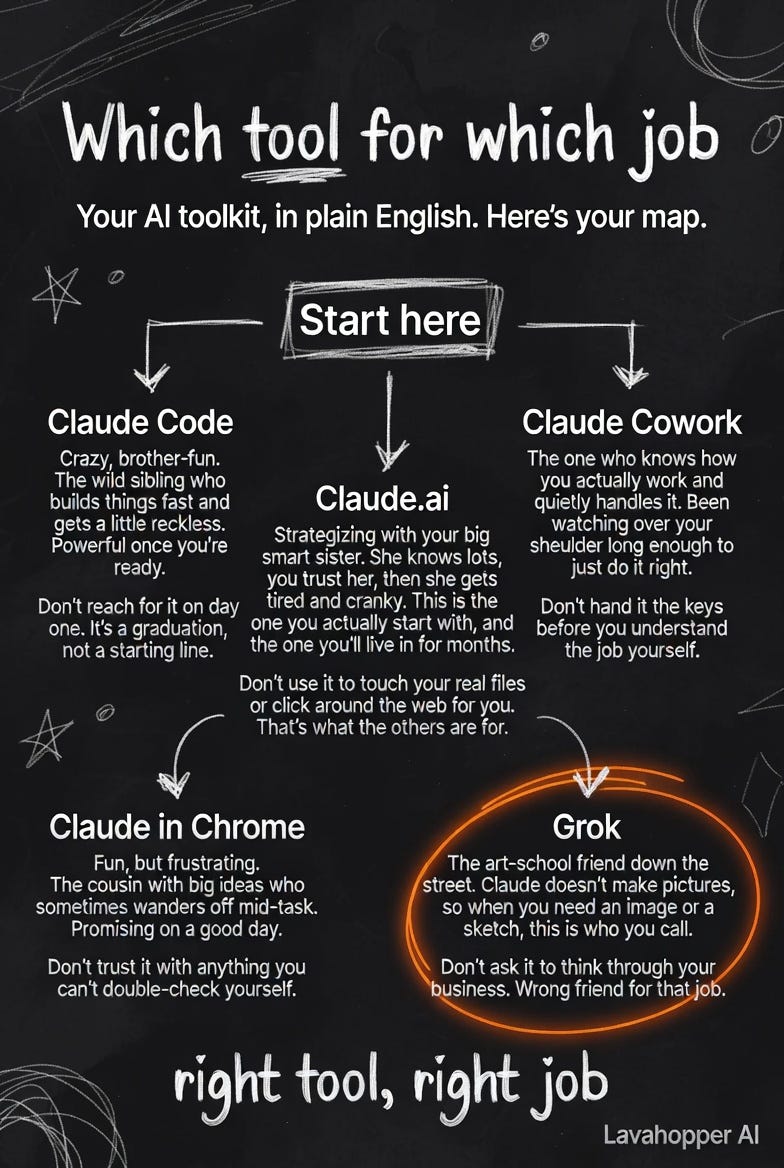
Claude.ai is your home base
This is the chat window. You type a question or a task, it answers, you go back and forth. It is the one almost everybody means when they say “I tried Claude.”
Think of it as strategizing with your big smart sister. She knows a lot, more than you do about most things, and you learn to trust her. Then some days she gets a little tired and cranky, gives you a half-answer, loses the thread of a long conversation. That is real. It is not you. You learn her rhythms and you work with them.
This is where you do your thinking out loud. Draft the email. Talk through the pricing problem. Rewrite the proposal. Figure out what you actually mean before you say it to a customer. For ninety percent of what a normal business owner needs from AI, this window is the whole answer. You can run a business on this one tool for a long time before you need anything else, and most people never do need anything else.
Don’t use it to reach into your actual files or click around the web for you. It thinks and writes. It does not have hands. When you need hands, that is when you look at the others.
The other three, and when you’d reach for each
These are real, and they are good, but they are graduations. You earn your way to them by first knowing what you are trying to do. Hand a power tool to someone who has not figured out the job yet and they just make a faster mess.
Claude Code is the wild brother. Crazy, brother-fun. It builds things, fast, and it is genuinely a blast to use once you are ready for it. It also gets a little reckless if you are not watching, because it can change real files and run real commands. This is the one I use most for the heavy building, but I did not start here, and you should not either. Don’t reach for it on day one. It is a graduation, not a starting line.
Claude Cowork is the one who knows how you actually work and quietly handles it. It has been watching over your shoulder long enough to just do the thing the way you would have, without you spelling out every step. When it fits your workflow it feels like having someone who gets it. Don’t hand it the keys before you understand the job yourself, because “do it the way I would” only works once there is a way you would.
Claude in Chrome is the cousin with the big ideas who sometimes wanders off mid-task. It drives your web browser, clicks things, fills forms, pulls information off pages. When it works it is genuinely useful and a little bit magic. When it does not, it wanders, and you are sitting there watching it click the wrong button. Fun, frustrating, promising on a good day. Don’t trust it with anything you cannot double-check yourself.
One more, and it is not a Claude
Here is a thing worth knowing early. Claude does not make pictures. If you need an image, a sketch, a logo idea, a header for a post, you go somewhere else for that.
I use Grok for it. Think of it as the art-school friend down the street. Wrong friend to talk through your business strategy, right friend when you need something drawn. Every sketch on my own site and in these articles started as a Grok prompt. Don’t ask it to think through your business. That is not its job, and it will show you it is not its job.
I am naming it because the map is not honest without it. People assume one AI does everything. It does not. You will use more than one, and that is normal.
So where does that leave you
Open Claude.ai. Use it until you hit a wall that it genuinely cannot get over, a wall where you find yourself thinking “I wish it could just go do this for me instead of telling me how.” That wish is the signal. That is the day you look at the other three and pick the one that matches the wall.
Not before. There is no prize for using the complicated tool early. The prize is getting your actual work done, and for most of your actual work, the sister at the kitchen table has you covered.
We love them all, some more than others depending on the day and which one we are leaning on. But in the end, they each show up for the right job. For a hamburger at another date.
I do not work for any of these tools. I just argue with all of them daily, like family.
LavaHopper